Overview
What Is Apilane?
Apilane is a backend platform that provides tools for developing and managing APIs for mobile and web client applications. It offers features such as database management, user authentication, file storage and more, aiming to simplify backend development.
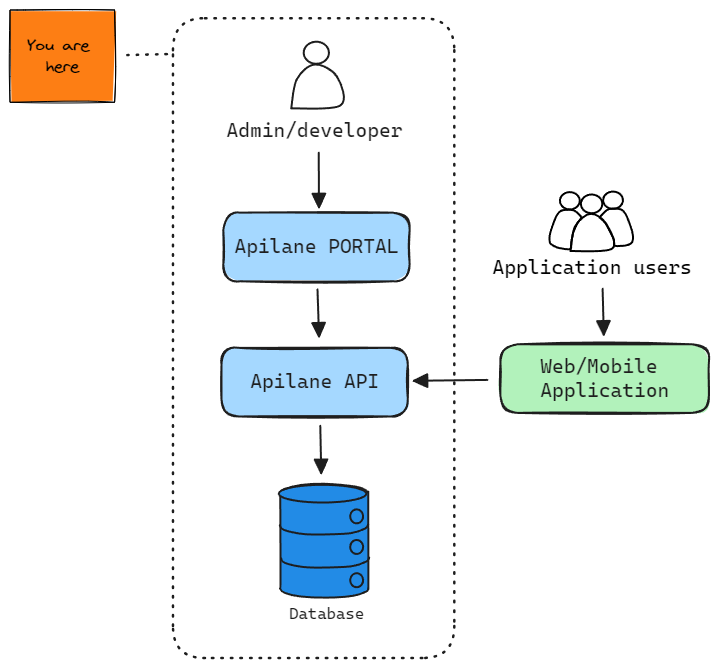
Key Features
| Feature | Description |
|---|---|
| Data Management | Create entities and properties via the Portal. Full CRUD with filtering, sorting, and paging. |
| User Authentication | Built-in registration, login, token management, password reset, and email confirmation. |
| File Storage | Upload, download, and manage files with role-based access control. |
| Role-Based Security | Granular access control on entity, property, and custom endpoint level. |
| Transactions | Atomic multi-operation transactions with cross-referencing between operations. |
| Custom Endpoints | Run custom SQL queries as API endpoints with parameterized inputs. |
| Aggregation & Stats | Run aggregate functions (Count, Sum, Avg, Min, Max) and distinct queries on your data. |
| Reports | Build visual reports (grids and pie, line, bar, radar and stacked bar charts) from the Portal. |
| Email Templates | Configurable email templates for registration confirmation and password reset. |
| Change Tracking | Optional entity history to audit record changes over time. |
| Schema API | Retrieve your application schema programmatically at runtime. |
| .NET SDK | Type-safe .NET SDK with builder pattern for the account, data, transaction, file, stats, custom endpoint and schema calls. |
| JavaScript SDK | A single-file JavaScript SDK for browsers and Node.js 19+. |
Why Apilane?
-
Rapid Development — Pre-built backend services (authentication, data management, file storage) let you focus on your frontend.
-
Scalability — Built on Microsoft Orleans for distributed state management, ensuring your application remains responsive as it grows.
-
Simplicity — Easy-to-use REST API and Portal UI. No backend expertise required.
-
Security — Data encryption, role-based access control, IP allow/block lists, and sliding window rate limiting.
-
Storage Providers — Out-of-the-box support for SQLite, SQL Server, MySQL and PostgreSQL.
Quick Start
Execute the provided docker-compose.yaml to spin up the Portal and API. The two share an installation key: the first command stores a random one in a .env file next to the compose file, only if it is not there yet. Keep that file for every later run.
grep -qs "^APILANE_INSTALLATION_KEY=." .env || echo "APILANE_INSTALLATION_KEY=$(openssl rand -hex 32)" >> .env
docker-compose -p apilane up -d
Access the Portal at http://localhost:5000 to set up the first administrator.
Use the random temporary password from the Portal startup output
(docker-compose -p apilane logs apilanewebportal), then choose your email address and a new password.
Setup must be completed before you can use the Portal.
For a complete walkthrough, including the addresses the two services use to reach each other, follow the Getting Started guide.